Log a feed without unlocking your iPhone
Start a feed in CradleFree and lock your iPhone. The card on the lock screen switches sides, pauses and ends the feed, with no Face ID or passcode. Put Left side and Right side at the bottom of the lock screen as well, and starting a feed doesn't need unlocking either.
Last updated November 1, 2026
 Coming soon to the App StoreNeeds iOS 26 or later. Free for 14 days, no card.
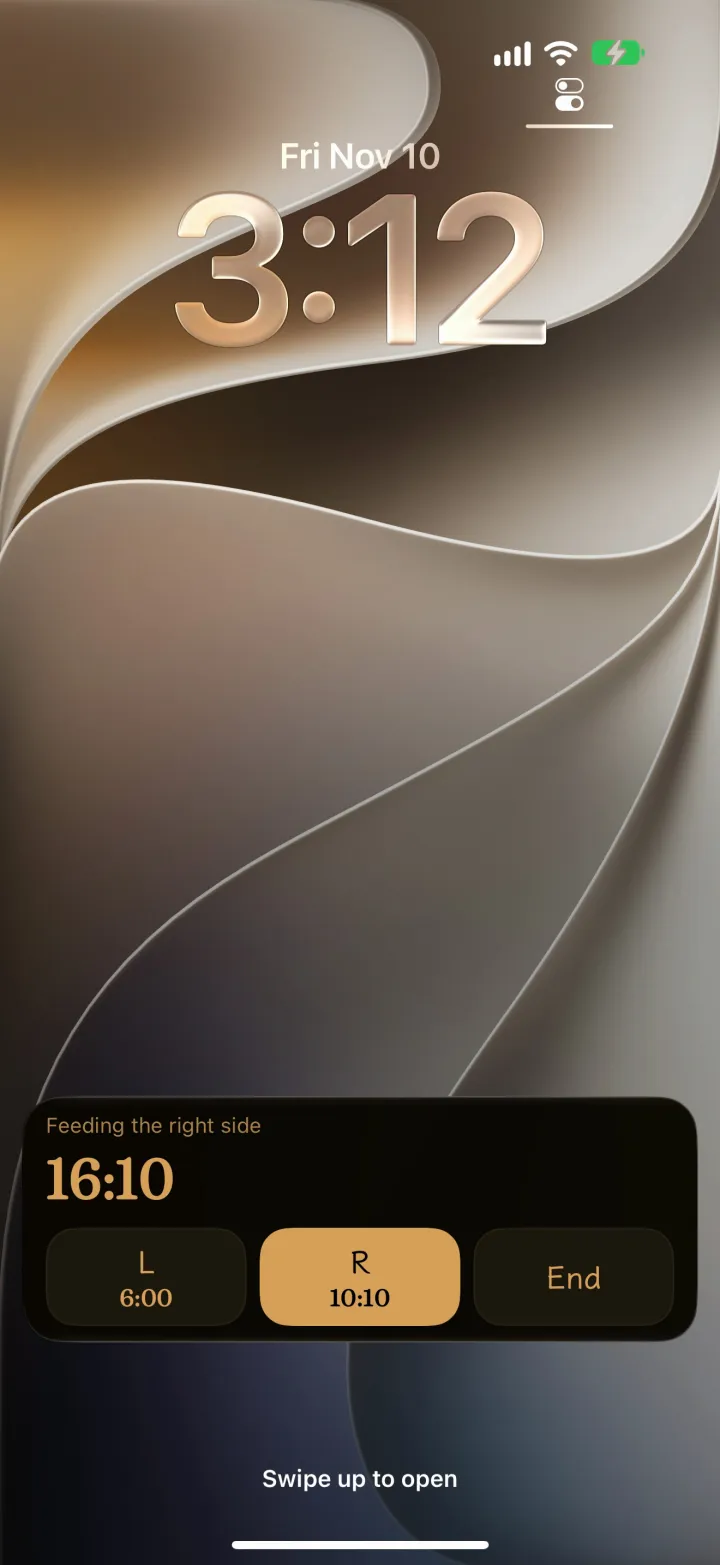
On the lock screen at 3 a.m.
Nine seconds on a loop. The button plays the whole film, 68 seconds with sound.
What you need
- An iPhone with iOS 26 or later. CradleFree is iPhone only and has no Apple Watch app.
- The card and the lock-screen buttons are part of the Family Pass. The 14-day free trial includes them; what changes after it is further down.
Log a feed with the phone locked
- Open CradleFree and tap Left or Right on the Log tab.
- Lock your iPhone. The CradleFree card on the lock screen shows the time so far and three buttons: L, R and End.
- To switch sides, tap the other side. To pause for a burp, tap the side that's feeding, and tap a side again to carry on.
- When the baby is done, tap End. The feed is saved with the time on each side, and the card goes away.
None of these taps asks for Face ID or your passcode. The card is black and amber, and CradleFree makes no sound.
After End, the lock-screen buttons start a new feed. To carry on with the feed you just ended, open CradleFree within 30 minutes and tap Left or Right.
Sleep and pumping get a card of their own. The sleep card has Soothe once and Woke up.
Start a feed without unlocking
The bottom corners of the lock screen hold the flashlight and the camera. Put CradleFree's Left side and Right side there instead, and one tap on the locked iPhone starts timing that side. You set this up once, with the phone unlocked.
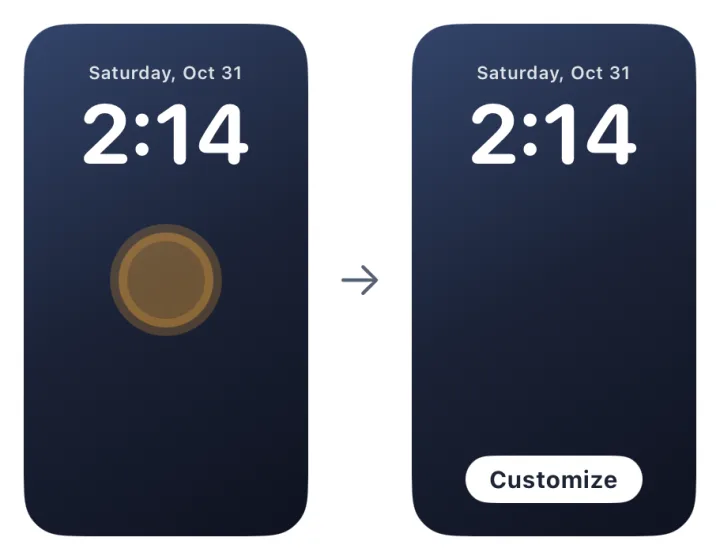
- Unlock with Face ID but stay on the lock screen. Hold an empty spot on the wallpaper, tap Customize, then pick Lock Screen.
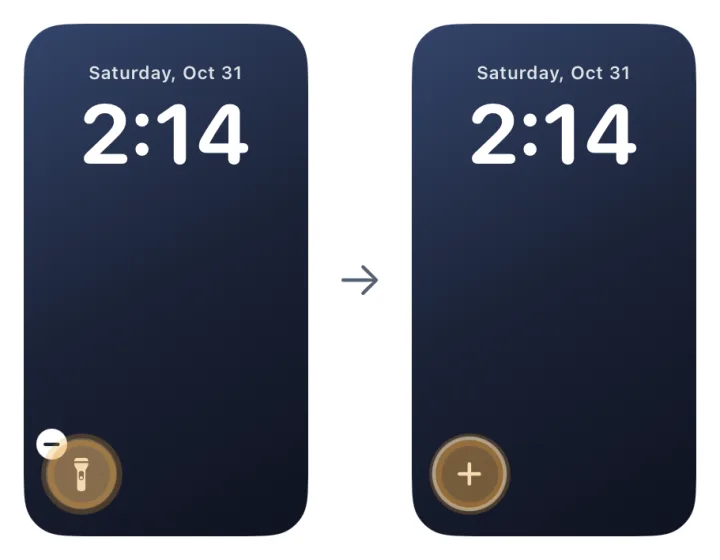
- Tap the − on the flashlight to take it off, then tap the empty + where it was. If you rarely use the camera, swap the bottom-right corner the same way.
- Search for CradleFree and pick Left side. In the bottom-right corner pick Right side, then tap Done at the top right.
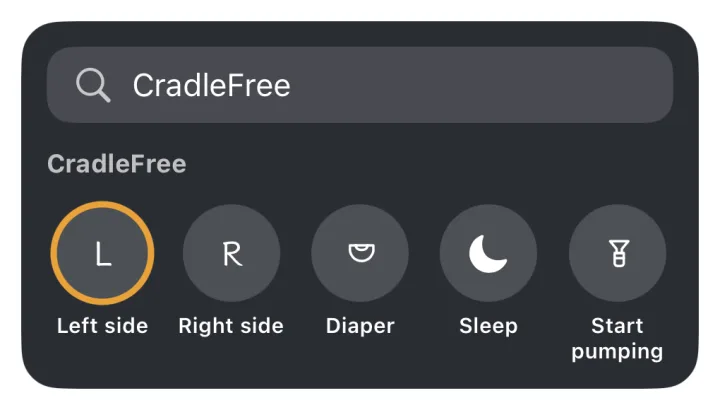
A button stays lit while its side is feeding. Tap the other one to switch sides, or the lit one again to pause. CradleFree shows these steps too, in Settings › Guide.
Control Center and the Action button
To add the buttons to Control Center, swipe down from the top-right corner, tap +, tap Add a Control and search for CradleFree. Along with Left side and Right side there are Sleep, Start pumping, and Diaper, which logs the kind of diaper you choose when you add it. Control Center opens on a locked iPhone, so these don't need Face ID either.
The iPhone 15 Pro and every iPhone 16 or later have an Action button on the left side, where older models have the Ring/Silent switch. Go to Settings › Action Button, swipe to Controls, tap the button below it and choose CradleFree's Left side or Right side. Press and hold the Action button to start timing that side.
What needs Face ID
| What you do | Face ID |
|---|---|
| Switch sides, pause or end on the card | Not needed |
| Left side or Right side at the bottom of the lock screen | Not needed |
| CradleFree buttons in Control Center | Not needed |
| Put the buttons on the lock screen | Once, while you set it up |
| Home Screen widget buttons, on the page you reach by swiping right on the lock screen | Your iPhone has to recognize your face; no need to swipe up |
| Enter a pumped amount | Yes: it opens CradleFree |
In the free version
When the 14-day trial ends and nobody in the family has bought the Family Pass, the lock screen has no card. Left side, Right side and the other buttons still log the feed, but only after you unlock, and CradleFree opens to show it's saved. Logging by hand and exporting stay free.
The Family Pass is US$19.99, paid once for the whole family. It isn't a subscription. What's free and what's in the Pass
If the card doesn't show up
- Check that Live Activities are on for CradleFree: Settings › Apps › CradleFree › Live Activities.
- Check whether the trial has ended. Without the Family Pass, the lock screen has no card.
- If you just tapped End, the card is gone because the feed is saved. It comes back with the next feed.
Questions
Does CradleFree work on Apple Watch?
No. CradleFree is iPhone only and has no Apple Watch app.
Will CradleFree make a sound or vibrate at night?
No. CradleFree makes no sound and doesn't vibrate. The one exception is a next-feed alarm you set yourself.